The Joint Entrance Examination (JEE) Main 2026 registration process will begin soon on the official website – jeemain.nta.nic.in. Conducted by the National Testing Agency (NTA), JEE Main serves as the gateway to top engineering colleges across India, including NITs, IIITs, GFTIs, and acts as a qualifying exam for JEE Advanced.
If you’re planning to appear for JEE Main 2026, it’s crucial to stay updated about the application form release date, registration process, fees, and the list of documents required. Here’s everything you need to know before filling out the JEE Main 2026 application form.
JEE Main 2026 Application Form Date
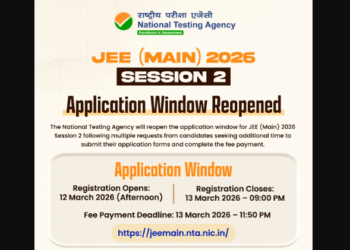
The NTA will release the JEE Main 2026 application form tentatively in October 2025. Candidates can register and submit their forms online through the official website. The registration process will be conducted in two sessions — Session 1 (January) and Session 2 (April).
JEE Main 2026 Registration Dates (Tentative)
| Event | Dates (Tentative) |
|---|---|
| JEE Main 2026 Registration Start Date | October 15, 2025 |
| JEE Main 2026 Registration Last Date | November 2025 |
| JEE Main 2026 Session 1 Exam | Fourth Week of January 2026 |
| JEE Main 2026 Session 2 Exam | April 2026 |
It is advisable for candidates to complete registration early to increase their chances of getting a preferred exam centre. The application form correction window will also be opened for a short period after the registration closes.
Steps to Fill the JEE Main 2026 Application Form
Filling out the JEE Main 2026 registration form is a simple yet crucial process. Candidates are advised to follow each step carefully to avoid errors or rejection.
Step 1: Online Registration
-
Visit the official website: jeemain.nta.nic.in
-
Click on the “JEE Main 2026 Registration” link.
-
Enter basic details such as name, date of birth, gender, contact number, and email ID.
-
Create a strong password and security question.
-
After successful registration, you’ll receive an application number for future login.
Step 2: Filling the Application Form
-
Log in using the generated application number and password.
-
Fill in personal, educational, and contact details accurately.
-
Select your preferred exam cities (NTA has confirmed that city choices will remain available).
-
Choose the paper type – B.E./B.Tech, B.Arch, or B.Planning, or all three.
-
Upload scanned photograph, signature, and other required documents.
Step 3: Payment of Application Fees
-
After completing the form, proceed to pay the application fee online using Credit/Debit Card, Net Banking, or UPI.
-
Once the payment is successful, take a printout of the confirmation page for reference.
JEE Main 2026 Application Fees
The JEE Main 2026 application fee varies based on the candidate’s category, gender, and exam paper type. Below is the tentative fee structure based on previous years.
| Category | Paper (B.E./B.Tech) | B.Arch/B.Planning | Both Papers |
|---|---|---|---|
| General/OBC (Male) | ₹1,000 | ₹1,000 | ₹2,000 |
| General/OBC (Female) | ₹800 | ₹800 | ₹1,600 |
| SC/ST/PwD | ₹500 | ₹500 | ₹1,000 |
| Foreign Candidates | ₹5,000 | ₹5,000 | ₹10,000 |
Note: Fees may vary slightly once the official notification is released by NTA. Candidates should check the latest details before payment.
Documents Required for JEE Main 2026 Registration
Before starting the registration process, ensure you have all the necessary documents ready in the required format. Any mismatch or incorrect document can lead to disqualification.
List of Required Documents:
| Document Name | Details | Format/Size |
|---|---|---|
| Passport-size Photograph | Recent colour photo with light background | JPG format, 10–200 KB |
| Signature | Candidate’s signature in black/blue ink | JPG format, 4–30 KB |
| Aadhaar Card | For identity verification | PDF (optional upload) |
| Class 10 Marksheet | For date of birth verification | PDF, under 500 KB |
| Class 12 Marksheet (if available) | For eligibility verification | PDF, under 500 KB |
| Caste/Category Certificate (if applicable) | SC/ST/OBC/EWS candidates | PDF, under 1 MB |
| PwD Certificate (if applicable) | For candidates with disabilities | PDF, under 1 MB |
| Valid ID Proof | Passport/PAN/Voter ID/School ID | PDF, under 500 KB |
Important Tips:
-
Ensure all documents are clear, properly scanned, and legible.
-
The name and date of birth should match across all documents.
-
Update your Aadhaar, Caste Certificate, or UDID Card in advance to avoid delays.
JEE Main 2026 Eligibility Criteria
Before applying, candidates must check the eligibility criteria carefully:
-
Educational Qualification: Passed Class 12 or equivalent exam in 2024 or 2025, or appearing in 2026.
-
Subjects: Must have studied Physics, Mathematics, and Chemistry/Biology/Biotechnology/Technical Vocational Subject.
-
Age Limit: No age restriction. However, candidates must meet the age criteria of the institute they are applying for.
-
Number of Attempts: Candidates can attempt JEE Main twice a year, and the best score will be considered for admission.
Common Mistakes to Avoid During JEE Main Registration
-
Entering incorrect personal details – Double-check name, date of birth, and category.
-
Uploading blurred images – Photos and signatures must meet the specified format.
-
Selecting the wrong exam city or paper type – Be careful while selecting preferences.
-
Submitting multiple forms – Only one form per session is allowed. Multiple forms will be rejected.
-
Not saving confirmation page – Always download and keep a copy of your confirmation for future reference.
What After JEE Main 2026 Registration?
After successful submission of the JEE Main 2026 application form:
-
Download the confirmation page.
-
Keep checking the official website for admit card release dates.
-
Use your application number and password to track updates.
-
Start revising the JEE Main syllabus and take mock tests regularly to boost your preparation.
The JEE Main 2026 registration is the first and most crucial step toward your dream of entering India’s top engineering colleges. Ensure you fill in all details correctly, upload valid documents, and pay the fees on time. Stay updated with the NTA JEE Main 2026 notification at jeemain.nta.nic.in for all the latest updates regarding exam dates, syllabus, and admit card.
Early preparation and timely registration can help you stay stress-free and confident as you move closer to achieving your engineering goals.
JEE Main 2026 Application Form Date FAQs
1. When will the JEE Main 2026 application form be released?
The JEE Main 2026 application form is expected to be released in October 2025 on the official website jeemain.nta.nic.in. Candidates can apply online for Session 1 (January 2026) and optionally for Session 2 (April 2026). Early registration is recommended to secure your preferred exam centre.
2. What is the JEE Main 2026 registration fee?
The application fee depends on your category and the paper type. Tentatively:
-
General/OBC (Male): ₹1,000 for B.E./B.Tech, ₹2,000 for both papers.
-
SC/ST/PwD: ₹500 for one paper, ₹1,000 for both.
-
Female candidates: Reduced fee, ₹800 for one paper.
-
Foreign candidates: ₹5,000 for one paper, ₹10,000 for both.
Fees are to be paid online via Credit/Debit Card, Net Banking, or UPI.
3. Which documents are required to fill the JEE Main 2026 application form?
Candidates must keep the following documents ready:
-
Passport-size photograph and signature (scanned)
-
Aadhaar card for identity verification
-
Class 10 & 12 marksheets
-
Caste/Category certificate (if applicable)
-
PwD certificate (if applicable)
-
Valid ID proof like Passport or PAN
All documents should be clear, legible, and in the prescribed format.
4. Can I correct my JEE Main 2026 application form after submission?
Yes, NTA provides a form correction window for a limited period after submission. During this window, candidates can edit details like exam city, personal information, and contact details. However, multiple submissions for the same session are not allowed, and the first successfully submitted form will be considered.
5. How do I know if my JEE Main 2026 application is successfully submitted?
After completing registration, filling the form, and paying the fee, candidates will receive a confirmation page. Download and keep this page safely. You can also log in to the official website using your application number and password to check the submission status. Without confirmation, the application will not be considered valid.